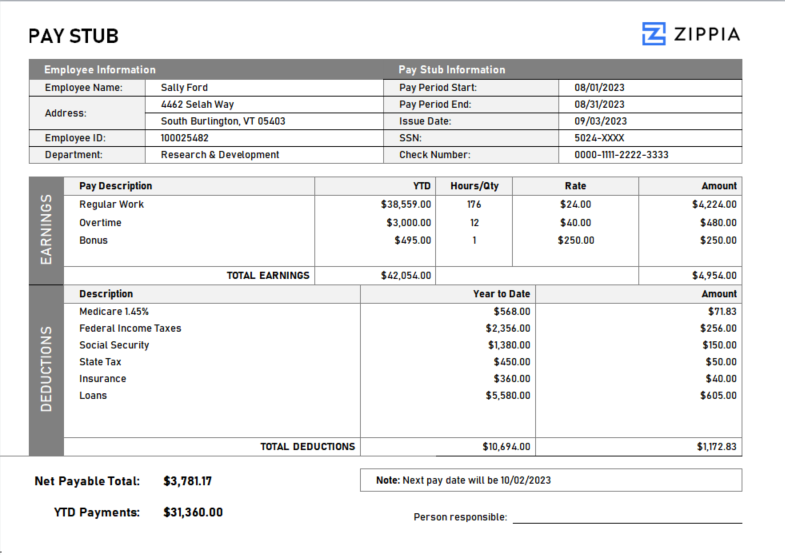
A pay stub is an essential document that details an employee’s earnings for a specific pay period. It typically includes gross pay, deductions, net pay, and often year-to-date totals, providing a clear financial overview for both employees and employers.
By clicking Download, you agree to Zippia’s Privacy Policy and Terms of Use.

How to Create a Pay Stub
-
Start by entering both employee and employer details, including names, addresses, and identification numbers.
-
List the gross income for the pay period, detailing regular salary, overtime, commissions, or bonuses when applicable.
-
Include all deductions, such as taxes, health insurance premiums, retirement contributions, and any other withholdings.
-
Calculate net pay by subtracting total deductions from gross pay, representing the actual amount the employee receives.
-
Offer a year-to-date summary of total income and deductions for easier financial tracking.
How to Use a Pay Stub Template
Utilizing a pay stub template can streamline the creation of pay stubs, ensuring all necessary components are included. Here’s how to effectively use one:
-
Choose a pay stub template that meets your company’s payroll requirements.
-
Input the employee’s information, including the pay period dates, gross pay, and deductions.
-
Verify that the calculated net pay accurately reflects the employee’s take-home income after deductions.
-
Double-check for accuracy before providing the pay stub to the employee along with their paycheck.
Pay Stub FAQ
-
Why are pay stubs important? Pay stubs are crucial as they document an employee’s earnings and deductions, often needed for loan applications or employment verification.
-
Can I create a pay stub online? Absolutely! Numerous online platforms offer tools and templates to generate accurate pay stubs.
-
Are employers required to provide pay stubs? Employers are not mandated to provide pay stubs in all states; requirements differ by location. Certain states do require pay stubs, while others do not.
In conclusion, having a well-structured pay stub is not only vital for transparency in payroll management but also enhances trust between employers and employees. With the right template, creating and managing pay stubs can be a straightforward process that meets all legal requirements and supports financial clarity.

Author

Matthew Zane is the lead editor of Zippia's How To Get A Job Guides. He is a teacher, writer, and world-traveler that wants to help people at every stage of the career life cycle. He completed his masters in American Literature from Trinity College Dublin and BA in English from the University of Connecticut.