Find a Job You Really Want In
By clicking Download, you agree to Zippia’s Privacy Policy and Terms of Use.

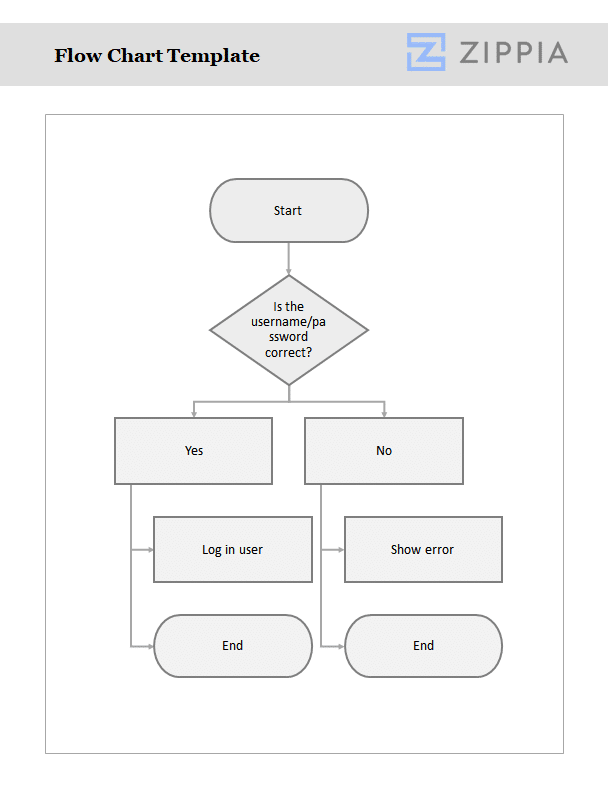
A flowchart is a diagram that visually represents a workflow or process, illustrating steps as various boxes connected by arrows. This visual representation serves as an effective model for problem-solving and understanding complex processes, which is increasingly relevant in today’s dynamic work environments.
How to Create a Flowchart
To develop a flowchart, follow these essential steps:
-
Identify the specific process or task you wish to illustrate.
-
Define the starting and endpoint of the process clearly.
-
List all the steps involved in the process.
-
Arrange these steps in the order they occur.
-
Draw a box for each step and connect them with arrows to indicate the flow of the process.
-
Review the flowchart for accuracy, ensuring it effectively communicates the intended workflow.
How to Use a Flowchart Template
Flowchart templates offer a practical starting point for creating your flowchart. Begin by selecting a template that matches the process you want to depict. Replace any placeholder content with your specific steps, adjusting the flow and order as necessary to reflect your unique process. Finally, verify that all connections between steps are correctly represented, ensuring your flowchart is clear and easy to follow.
FAQ about Flowcharts
-
Why are flowcharts beneficial? Flowcharts provide a visual representation of processes, breaking down complex workflows into simple and understandable diagrams, which enhances effective communication and aids in project management.
-
What are common flowchart symbols? Common symbols include rectangular boxes for process steps, diamonds for decision points, and arrows to indicate the flow of the process.
-
Can flowcharts be applied to any process? Yes, flowcharts can illustrate virtually any process; however, they are most effective for linear, step-by-step workflows with clear beginnings and endings.
In summary, flowcharts are invaluable tools for visualizing processes in today’s fast-paced work environment. By utilizing a flowchart template, you can enhance clarity and communication within your team, making complex workflows more manageable. Download our flowchart template today to streamline your process mapping!

Author

Matthew Zane is the lead editor of Zippia's How To Get A Job Guides. He is a teacher, writer, and world-traveler that wants to help people at every stage of the career life cycle. He completed his masters in American Literature from Trinity College Dublin and BA in English from the University of Connecticut.